Plan for SharePoint domain name change
/ 1 min read
Table of Contents
The problem
Changing your hashtag#SharePoint domain is now surprisingly easy, just one line of hashtag#PowerShell (seriously). Check it out: https://learn.microsoft.com/en-us/sharepoint/change-your-sharepoint-domain-name But don’t be fooled by the simplicity: the real challenge starts after you hit Enter 😅
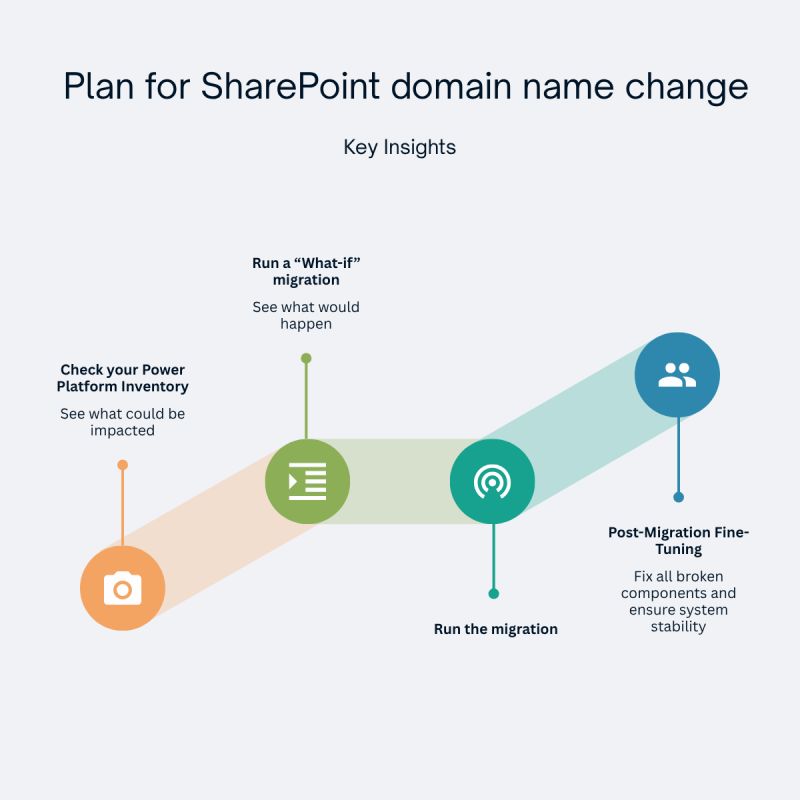
What to do?
1- Review your Power Automate flows, Power Apps, and Power BI reports:
𝗠𝗮𝗻𝘆 𝗨𝗥𝗟𝘀 𝗽𝗼𝗶𝗻𝘁 𝘁𝗼 𝘁𝗵𝗲 𝗼𝗹𝗱 𝗱𝗼𝗺𝗮𝗶𝗻. 𝗘𝘃𝗲𝗻 𝘁𝗵𝗼𝘂𝗴𝗵 𝗿𝗲𝗱𝗶𝗿𝗲𝗰𝘁𝘀 𝘄𝗼𝗿𝗸 𝗳𝗼𝗿 𝟭 𝘆𝗲𝗮𝗿 𝘀𝗼𝗺𝗲 𝗰𝗼𝗺𝗽𝗼𝗻𝗲𝗻𝘁𝘀 𝘄𝗶𝗹𝗹 𝗯𝗿𝗲𝗮𝗸.
2- Run the cmdlet with -WhatIf parameter: this shows what would happen if the cmdlet runs.
𝗦𝘁𝗮𝗿𝘁-𝗦𝗣𝗢𝗧𝗲𝗻𝗮𝗻𝘁𝗥𝗲𝗻𝗮𝗺𝗲 -𝗗𝗼𝗺𝗮𝗶𝗻𝗡𝗮𝗺𝗲 ”𝗻𝗲𝘄𝗱𝗼𝗺𝗮𝗶𝗻” -𝗦𝗰𝗵𝗲𝗱𝘂𝗹𝗲𝗱𝗗𝗮𝘁𝗲𝗧𝗶𝗺𝗲 (𝗚𝗲𝘁-𝗗𝗮𝘁𝗲).𝗔𝗱𝗱𝗗𝗮𝘆𝘀(𝟳) -𝗪𝗵𝗮𝘁𝗜𝗳
3- Do a post-Migration fine-tuning
Conclusion
If you’ve reviewed your Power Platform inventory, everything should be more straightforward 🥲 😁